The Role of Version Control Systems in Implementing DevOps
Introduction to version control systems
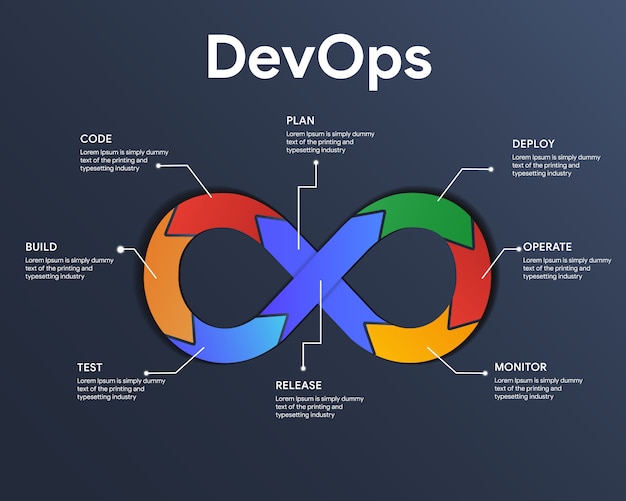
In the DevOps domain, version control systems are vital for orchestrating seamless collaboration between development and operations teams. These systems, crucial for managing code, configurations, and infrastructure-as-code, are the linchpin of continuous integration and deployment. This guide explores their pivotal role in enhancing collaboration, traceability, and agility within the DevOps landscape, from managing infrastructure changes to automated testing and deployment.
The importance of version control in software development
Version control systems play a pivotal role in software development, offering a multitude of reasons why they are indispensable. Let's delve into the key aspects:
- Historical Recordkeeping:
- Version control systems serve as a meticulous recorder, documenting every change made to the codebase.
- This historical record provides developers with insights into the evolution of the code, aiding in understanding and tracking changes over time.
- Troubleshooting and Reversion:
- The historical perspective proves invaluable in debugging issues or reverting to a previous version, especially in critical error scenarios.
- It acts as a reliable guide, helping developers navigate through the code's history for effective issue resolution.
- Collaboration Facilitation:
- Version control systems are team enablers, fostering collaboration among developers.
- Multiple team members can concurrently work on different branches of the codebase, making changes and seamlessly merging them.
- This promotes efficient teamwork and serves as a conflict mitigation strategy.
- Safety Net for Developers:
- Serving as a safety net, version control systems act as a robust backup system.
- Changes are securely stored, ensuring that no data is lost and providing a means for code recovery, even in the face of catastrophic failures.
- This safety net enhances the confidence of developers, knowing that their work is secure and retrievable in unforeseen circumstances.
Why version control systems are important in implementing DevOps
Delving into the world of DevOps, it's a software development approach designed to unite development and operations teams, fostering collaboration, automation, and continuous integration and deployment. Here's how version control systems weave into the fabric of DevOps practices:
- Centralized Repository Facilitation:
- Version control systems take center stage by providing a centralized repository for code.
- This becomes the hub where developers and operations teams seamlessly collaborate, ensuring a unified approach to software development.
- Automated Testing and Deployment:
- The role of version control systems extends to the automation realm.
- They enable the automatic testing and deployment of code, ensuring changes are smoothly implemented without disruptions to the production environment.
- Change Tracking and Rollback Capability:
- Version control systems serve as vigilant guardians, tracking changes meticulously.
- In case a step back is needed, they empower the ability to roll back to a previous version, ensuring a safety net for the DevOps process.
- Continuous Integration and Deployment Principles:
- By orchestrating centralized collaboration, automation, and efficient change tracking, version control systems become instrumental in upholding the principles of continuous integration and deployment.
- This synergy facilitates the faster delivery of high-quality software, aligning with the core goals of the DevOps approach.
Understanding the basics of a version control system
Embarking on the exploration of version control systems? Let's start with the basics. Picture a version control system as your reliable toolkit for handling changes to files over time. Here's a breakdown of its core functions:
- Change Tracking:
- The system diligently tracks who made changes to files.
- It provides a record of the specifics of each alteration and timestamps for when they occurred.
- Techniques for Management:
- Utilizing various techniques, the system stores multiple versions of files.
- It keeps a vigilant eye on changes at the granular level, tracking modifications line by line.
- Harmony in Collaboration:
- Version control systems act as facilitators for collaboration.
- Multiple users can seamlessly work on the same files concurrently, creating a collaborative environment.
Understanding these foundational concepts is your compass when choosing and effectively utilizing a version control system for your organization. It's not just a tool; it's your guiding companion in the intricate landscape of file management and collaboration. So, let the journey begin, equipped with the insights to navigate the world of version control systems.
Different types of version control systems
There are several types of version control systems, each with distinct advantages and use cases. The two main categories are centralized version control systems (CVCS) and distributed version control systems (DVCS).
- Centralized Version Control Systems (CVCS):
- In CVCS, a single server stores the entire codebase.
- Developers check out files from this central server.
- Examples of CVCS include Subversion (SVN) and Perforce.
- Distributed Version Control Systems (DVCS):
- In DVCS, there is no reliance on a central server.
- Each developer maintains a local copy of the entire codebase, including the complete history.
- Examples of DVCS include Git, Mercurial, and Bazaar.
Both types have their respective pros and cons. The choice between CVCS and DVCS depends on the specific needs and workflows of the development team. CVCS centralizes the codebase, making it accessible from a central server, while DVCS allows each developer to have a complete local copy, enhancing flexibility and independence. The decision should align with the collaborative requirements and preferences of the development process.
Benefits of using a version control system
Utilizing a version control system comes with a host of benefits for software development teams. Let's unpack these advantages:
- Systematic Change Management:
- A version control system provides a structured approach to managing and tracking changes in the codebase.
- Every modification is meticulously recorded, offering a comprehensive view of the code's evolution over time.
- Historical Insight:
- This systematic recording provides invaluable historical perspective, aiding developers in troubleshooting and analysing the impact of specific changes.
- It serves as a reliable guide for understanding the journey of the codebase.
- Facilitated Collaboration:
- Version control systems are team enablers, fostering collaboration among team members.
- Multiple developers can seamlessly work on the same project, making changes and merging them, promoting efficient teamwork while minimizing conflict risks.
- Backup Assurance:
- Beyond collaboration, version control systems act as a safety net by serving as a backup mechanism.
- Changes are never lost, ensuring code recovery in case of failures or mistakes, providing an added layer of security and confidence for development teams.
Overview of different types of version control systems
Now, let's zoom in on some of the leading version control systems that shape the landscape of software development today. Explore their nuances:
- Git:
- Type: Distributed Version Control System (DVCS)
- Key Features:
- Git stands out for its flexibility and efficiency in code management.
- Noteworthy capabilities include branching and merging, facilitating seamless collaboration and efficient codebase version management.
- Subversion (SVN):
- Type: Centralized Version Control System (CVCS)
- Adoption:
- SVN has earned widespread industry adoption as a centralized system.
- Code Management:
- Known for its simplicity, SVN offers a straightforward approach to code management, making it a favoured choice for many organizations.
- Mercurial:
- Type: Distributed Version Control System (DVCS)
- Distinct Features:
- Mercurial comes with its own set of unique features, contributing to its popularity.
- It offers a different approach compared to Git, catering to diverse preferences within the development community.
- Perforce:
- Type: Centralized Version Control System (CVCS)
- Standout Traits:
- Perforce has its own distinctive features that make it a notable contender.
- As a centralized system, it provides specific advantages, catering to the preferences of certain development workflows.
- Bazaar:
- Type: Distributed Version Control System (DVCS)
- Uniqueness:
- Bazaar brings its own unique flavour to the mix of version control systems.
- Its features and advantages contribute to its presence in the toolkit of developers with specific needs.
These version control systems, each with its own flavour and strengths, offer a diverse toolkit for developers and organizations to choose from based on their specific requirements and workflows.
Exploring the Git version control system
Taking centre stage in recent years, Git has garnered immense popularity, thanks to its robust features and adaptability. Let's dissect why it has become a go-to choice:
- Type:
- Git operates as a Distributed Version Control System (DVCS).
- Local Development Flexibility:
- Developers can independently work on their local copies of the codebase with Git.
- Synchronization of changes with the central repository ensures a smooth collaborative process.
- Extensive Command Set:
- Git boasts a comprehensive array of commands and features.
- These include easy tracking of changes, branch creation, seamless merging, and efficient collaboration tools.
- De Facto Standard:
- Git has solidified its position as the de facto standard for version control in numerous organizations.
- Its widespread adoption in the DevOps community speaks volumes about its reliability and effectiveness.
- Essential for DevOps Implementation:
- Git's understanding is paramount for developers and organizations delving into effective DevOps practices.
- Its role as a linchpin in version control makes it an indispensable tool for streamlined and collaborative development workflows.
Advantages of using Git in DevOps
Git stands out as a powerhouse in the implementation of DevOps practices, bringing forth a host of advantages:
- Distributed Collaboration:
- Git's distributed nature simplifies collaboration, allowing developers and operations teams to concurrently work on different branches.
- This seamless collaboration aligns perfectly with the collaborative ethos of DevOps.
- Robust Branching and Merging:
- Git offers a robust feature set for branching and merging, a cornerstone for successful continuous integration and deployment.
- Feature branches facilitate the development of new features without disrupting the main codebase, promoting an organized and efficient workflow.
- Continuous Integration and Deployment Support:
- The ability to create feature branches in Git is pivotal for continuous integration and deployment.
- Developers can work on features independently, and once completed, seamlessly merge them back into the main branch, facilitating a smooth and continuous delivery process.
- Speed and Efficiency:
- Git's speed and efficiency shine, making it an ideal choice for large codebases and distributed teams.
- Capable of handling extensive files and lines of code without performance hiccups, Git proves adaptable for organizations of all sizes.
Git's prowess in distributed collaboration, its robust branching and merging capabilities, and its speed and efficiency collectively make it a linchpin in the DevOps toolbox, fostering streamlined and effective development practices.
Best practices for using Git in DevOps
Unlocking the full potential of Git in a DevOps environment involves adhering to key best practices. Let's delve into these guidelines:
- Adopt a Thoughtful Branching Strategy:
- Choose a branching strategy tailored to your organization's needs, whether it's a straightforward branch-per-feature approach or a more intricate workflow like Gitflow.
- A well-defined branching strategy enhances effective change management and fosters collaboration among team members.
- Automate Testing and Deployment:
- Leverage automation in testing and deployment processes through tools like continuous integration and continuous deployment (CI/CD) pipelines.
- Automated testing and deployment ensure thorough testing and error reduction, accelerating the delivery process.
- Enforce Code Reviews and Pull Requests:
- Integrate code reviews and pull requests into your development workflow.
- This practice promotes code quality by ensuring that changes undergo scrutiny and approval from team members before merging into the main codebase.
Following these best practices not only optimizes Git usage but also aligns development processes with DevOps principles, fostering efficiency, collaboration, and high-quality code delivery. It's the roadmap to harnessing Git's capabilities for maximum impact in your DevOps journey.
Comparing Git with other popular version control systems
Unlocking the full potential of Git in a DevOps environment involves adhering to key best practices. Let's delve into these guidelines:
- Adopt a Thoughtful Branching Strategy:
- Choose a branching strategy tailored to your organization's needs, whether it's a straightforward branch-per-feature approach or a more intricate workflow like Gitflow.
- A well-defined branching strategy enhances effective change management and fosters collaboration among team members.
- Automate Testing and Deployment:
- Leverage automation in testing and deployment processes through tools like continuous integration and continuous deployment (CI/CD) pipelines.
- Automated testing and deployment ensure thorough testing and error reduction, accelerating the delivery process.
- Enforce Code Reviews and Pull Requests:
- Integrate code reviews and pull requests into your development workflow.
- This practice promotes code quality by ensuring that changes undergo scrutiny and approval from team members before merging into the main codebase.
Following these best practices not only optimizes Git usage but also aligns development processes with DevOps principles, fostering efficiency, collaboration, and high-quality code delivery. It's the roadmap to harnessing Git's capabilities for maximum impact in your DevOps journey.
Best practices for using a version control system in DevOps
Beyond specific practices for Git, embracing general best practices enhances the effectiveness of any version control system within a DevOps environment. Let's explore these overarching guidelines:
- Foster a Culture of Collaboration and Communication:
- Cultivate a collaborative atmosphere among team members, emphasizing knowledge sharing and feedback.
- Encourage the consistent use of version control systems for all code-related activities, fostering transparency and unified practices.
- Automate Repetitive Tasks:
- Prioritize automation for repetitive tasks like testing, building, and deploying code.
- Automation ensures swift and reliable delivery of changes, minimizing manual efforts and streamlining the development pipeline.
- Continuous Monitoring and Measurement:
- Implement continuous monitoring and measurement of both the version control system and DevOps processes.
- Regular assessment helps pinpoint bottlenecks and areas for improvement, enabling ongoing optimization and refinement of the development workflow.
By integrating these general best practices, teams not only maximize the benefits of version control systems like Git but also cultivate a DevOps culture characterized by collaboration, efficiency, and continuous improvement. It's the holistic approach to crafting a robust and streamlined development environment.
Choosing the right version control system for your organization
Selecting the ideal version control system for your organization involves a thoughtful consideration of various factors, tailored to your team, projects, and development workflow. Here's a guide to navigate this decision-making process:
- Team Size and Project Complexity:
- Tailor your choice based on the size of your team and the complexity of your projects.
- Larger teams and intricate projects may benefit from specific version control features that cater to their scale and complexity.
- Evaluate Strengths and Weaknesses:
- Conduct a thorough evaluation of the strengths and weaknesses of different version control systems.
- Consider how these align with your organization's requirements, ensuring a match with your specific needs.
- Consider Git's Versatility:
- Git, with its flexibility, powerful features, and widespread adoption, is a popular choice.
- Its adaptability makes it suitable for various scenarios, making it a safe bet for many organizations.
- Centralized Systems for Access Control:
- For organizations requiring strict access control and centralized management, centralized version control systems like Subversion (SVN) might be a better fit.
- Evaluate the specific access control needs of your organization to align with the system's capabilities.
- Support and Community Engagement:
- Gauge the level of support and community engagement around a version control system.
- A robust community can significantly impact your ability to seek help and resolve issues promptly.
Considering these factors in your decision-making process ensures that your chosen version control system aligns seamlessly with your organization's unique characteristics and requirements. It's the compass for navigating the diverse landscape of version control options
Conclusion
In the realm of DevOps, version control systems stand as linchpins, pivotal for the effective implementation of DevOps practices in software development. They introduce a systematic approach to change management, foster collaboration among team members, and uphold the integrity and reliability of the codebase. Git, emerging as the de facto standard, is widely embraced in the DevOps community.
Understanding the nuances of version control systems, exploring their types, and adhering to best practices empowers organizations to harness the prowess of version control. This, in turn, streamlines development workflows, facilitating the rapid delivery of high-quality software. The selection of a version control system is a strategic decision, necessitating a keen consideration of the unique needs and objectives of the organization.
A judicious choice aligns the selected system seamlessly with organizational goals, enabling the embracement of DevOps principles. With the right version control system in place, organizations can cultivate a DevOps culture marked by heightened collaboration, increased automation, and efficient continuous integration and deployment. It's the catalyst for achieving the core tenets of DevOps in the dynamic landscape of software development. 🖤